
What Are Claude Agent Skills? A Plain English Explanation
If you've been following this series, you now know what an AI agent is and what MCP does. This post covers the third piece of the puzzle: Agent Skills.
Skills are newer than MCP, simpler than most people expect, and genuinely useful in ways that took me a while to fully appreciate. I've built over 60 of them for my own content and marketing system. By the end of this post you'll understand what they are, how the mechanics work, and where they fit alongside the other tools in Claude's ecosystem.
The Problem Skills Solve
Here's a situation that comes up constantly when you work with AI tools regularly.
You ask Claude to write a LinkedIn post. It produces something fine. You ask again tomorrow and get something different in style, different in length, structured differently. Nothing wrong with either output individually. But there's no consistency, no accumulated knowledge of how you write, what your voice sounds like, or what's worked for your audience before.
Every conversation starts fresh. Claude doesn't remember that you prefer short punchy sentences, that you always open with a counterintuitive observation, or that your audience responds better to concrete examples than abstract frameworks.
This is what Skills were built to solve. Not data access (that's MCP's job). The question Skills answer is: how do I teach Claude to do something the way I want it done, and have it remember that across every session?
What a Skill Actually Is
A Skill is a folder. Inside that folder is a file called SKILL.md.
That's the core of it. A markdown file with a specific structure that Claude knows how to read and use.
The file has two parts. The first is a short header section (called frontmatter) with three fields: a name, a description, and a version number. The second is the actual instructions — written in plain English, as detailed as you want.
Here's what a minimal example looks like:
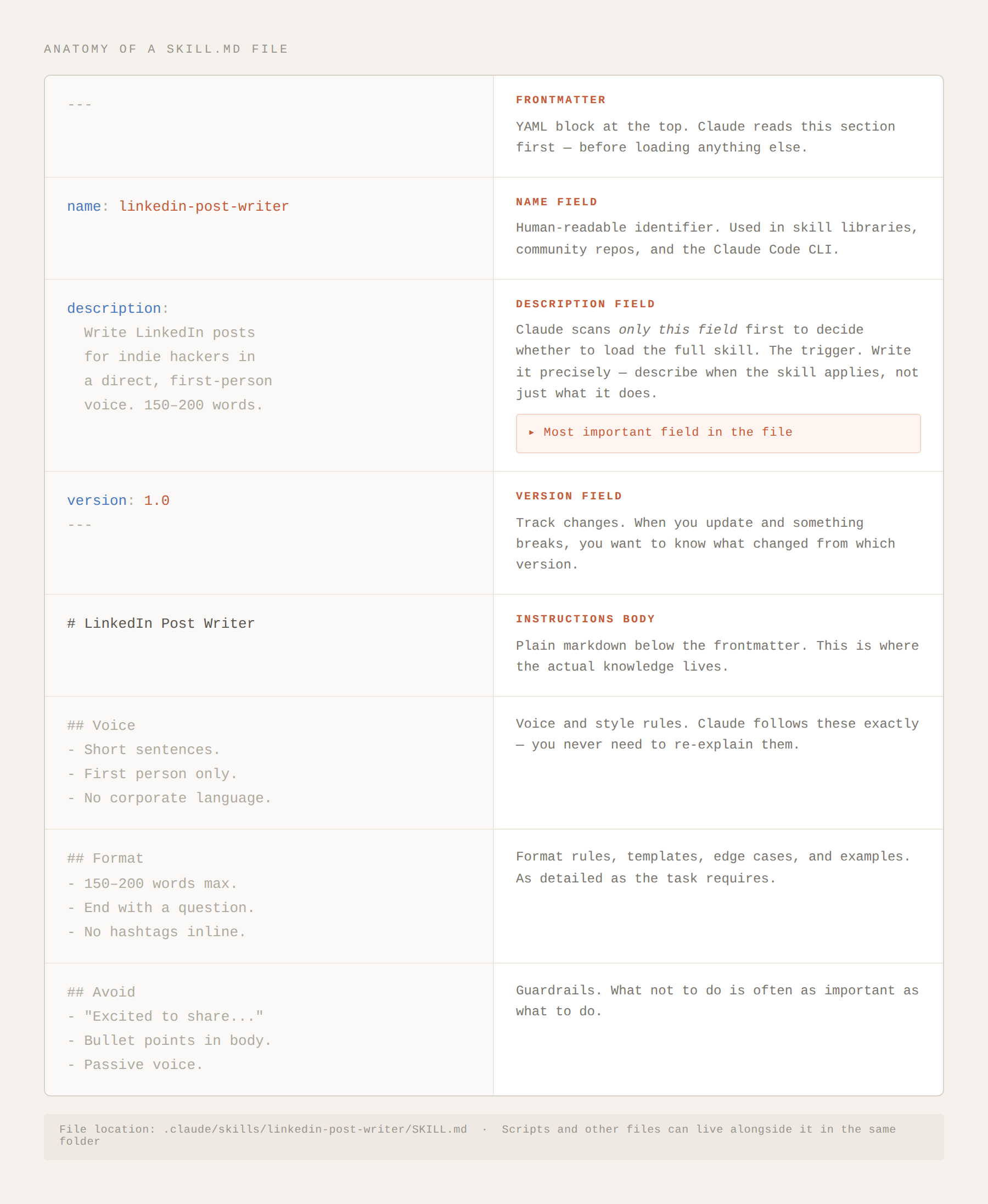
A skill is a markdown file with two parts: a short YAML header Claude scans first, and an instructions body that loads only when the skill matches your task.
When you ask Claude to write a LinkedIn post and this skill is active, Claude reads those instructions and follows them. Every time. Not because you reminded it. Because the knowledge lives in the skill file.
The Clever Part: Progressive Disclosure
Here's the design detail that makes Skills practical at scale.
Claude doesn't read every skill you have for every task. That would be expensive (more context = more tokens used) and slow.
Instead, Claude scans only the description field first. It reads hundreds of these short descriptions quickly and cheaply. If the description matches what you're asking for, Claude loads the full skill file. If it doesn't match, the skill stays dormant.
This is called progressive disclosure. The description is the filter. The full instructions only load when they're relevant.
This is why writing a good description matters more than you might think. The description field is doing double duty: it tells Claude when to use the skill, and it tells Claude what the skill does. Get that right and the whole system becomes much more reliable.
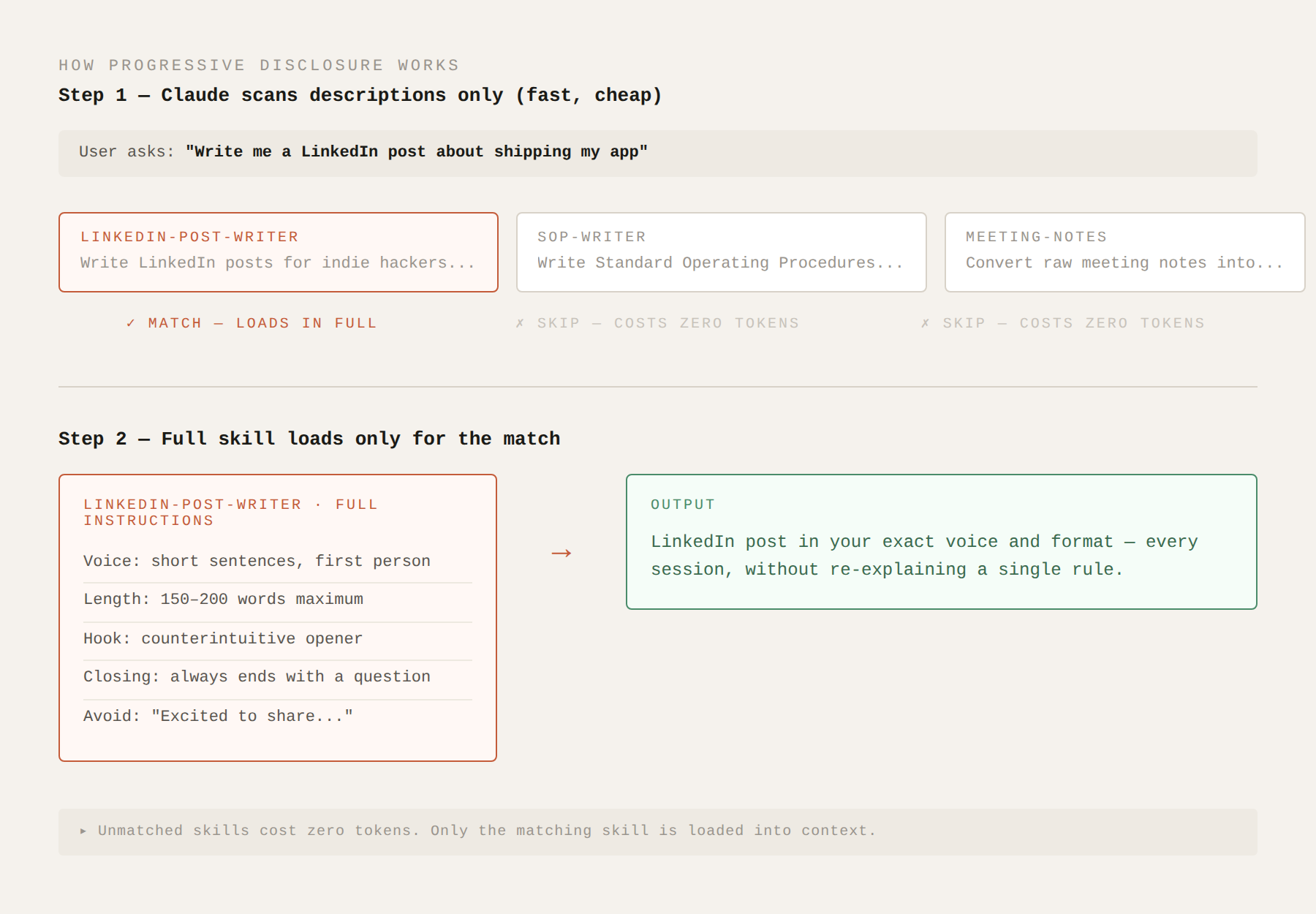
Claude reads hundreds of skill descriptions cheaply. Only the matching skill loads in full — the rest cost nothing.
How Skills Work Across Claude Products
Anthropic launched Agent Skills in October 2025. In December 2025, they published the format as an open standard. That decision matters for how you think about building them.
Skills work across:
Claude.ai (paid plans)
Claude Code (the command-line coding tool)
The Claude API (for developers building applications)
Because the format is now an open standard, it also works with other AI tools that have adopted the spec, including Cursor, Codex CLI, and Gemini CLI. A skill you build for Claude Code can, in principle, work in other agent environments that support the standard.
You build once. The knowledge travels.
What Skills Are Good For
Skills work best for repeatable tasks that require consistent style, structure, or domain knowledge.
Some examples from my own setup:
Content creation: I have skills for different social platforms — different voice, length, format, and hook style for each. When I ask for a tweet, the tweet skill loads. When I ask for a LinkedIn post, a different skill loads. I'm not re-explaining the format every time.
Domain knowledge: I have skills for each of my apps. When I ask for marketing copy for Undulate, the Undulate skill loads — it already knows the product positioning, the target audience, the tone (calm, evidence-based, no wellness clichés), and what the app actually does. That's knowledge I've built up once and reused across dozens of sessions.
Coding patterns: Developers use skills to encode project-specific conventions. Code style preferences, how to structure tests, which libraries to prefer, error handling patterns. Instead of explaining the architecture every time, the skill carries it.
Document templates: Report formats, proposal structures, email frameworks. Skills can store templates and the logic for when to use each variation.
What Skills Are Not Good For
Skills store static knowledge. They don't pull live data.
If you need Claude to read your actual Notion database right now, check your GitHub commits, or query your live spreadsheet, that's MCP's job, not Skills. MCP gives Claude live access to external systems. A skill can't do that.
Skills also don't update themselves. If your content strategy changes, you update the skill file manually. They're not dynamic.
And skills don't replace memory across conversations in the way you might hope. They're instructions, not a record of past sessions. Claude doesn't "remember" that it wrote for you last Tuesday from a skill. It just follows the instructions in the file each time.
The right mental model: a skill is like an employee handbook. It tells the new hire how to do the job. It doesn't tell them what happened last month.
Skills Alongside MCP: The Right Mental Model
Anthropic described it this way when they launched Skills: MCP is the aisle. Skills are the employee who knows which items you need.
Here's what that means practically.
MCP connects Claude to your Notion workspace. Claude can now read your pages, search your notes, create new entries. That's the live data layer.
A skill tells Claude how to use that access well. Which pages matter. How to structure a summary. What to ignore. What format to return results in.
You often want both. MCP for access, Skills for knowledge about how to act on that access.
I have an example from my own system: I use the Notion MCP server to connect Claude to my content calendar. And I have a skill that tells Claude how I like to structure content for different apps, what the voice guidelines are, and which products to prioritise each month. The MCP provides the live data. The skill provides the operating knowledge.
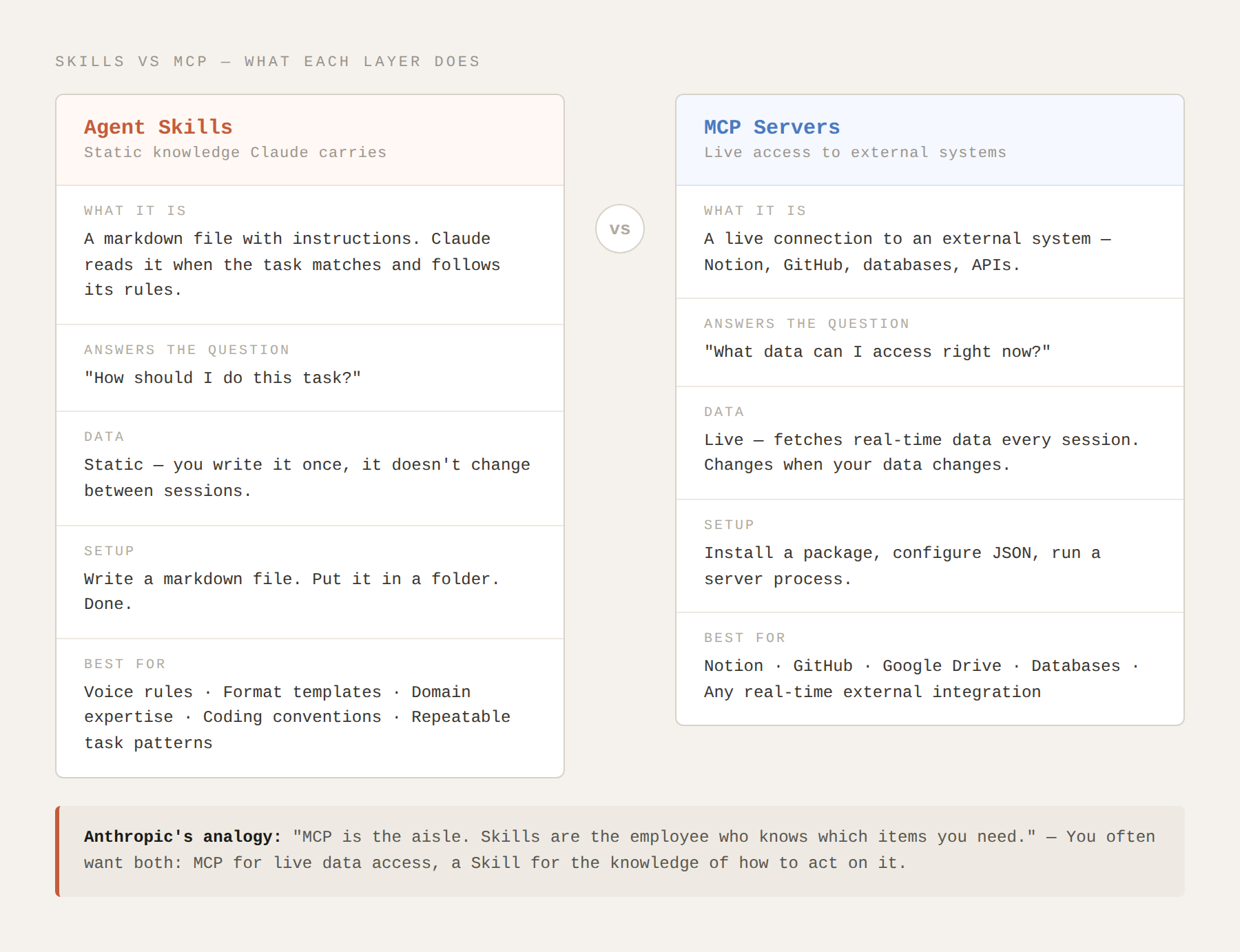
Skills carry static knowledge — voice, format, domain expertise. MCP provides live access to external systems. They solve different problems.
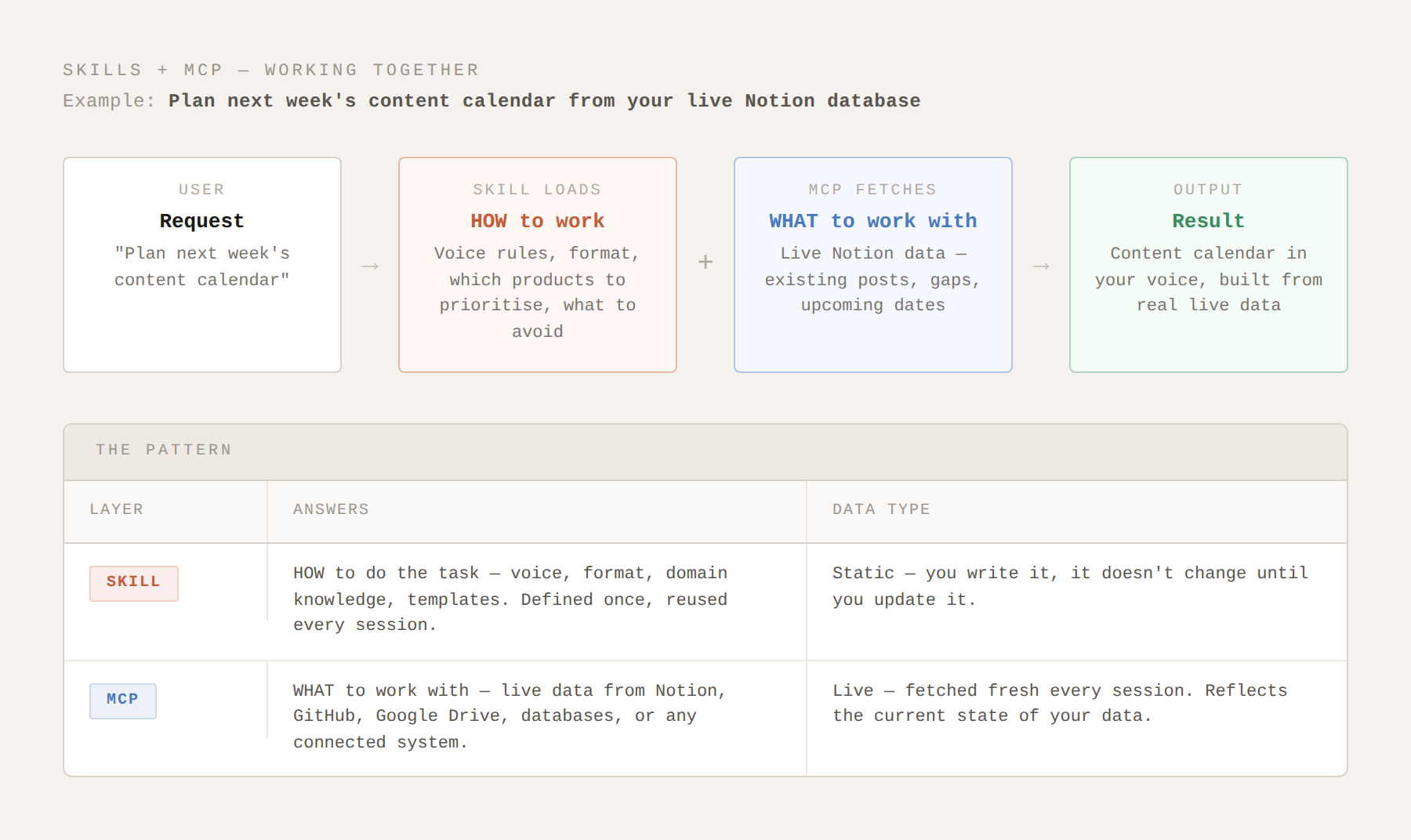
The full picture: a Skill tells Claude how to work, MCP tells Claude what to work with. Used together, you get output in your voice built from your live data.
How I Use Skills in Practice
I built my current system (internally I call it ShipKit) over about three months. It now has skills for different types of content, different products, different stages of a workflow. The orchestrator skill reads everything and decides which other skills to load.
A few things I learned building them:
Start with the description. I spent too long on the instructions before I realised the description is the more important thing to get right. Claude has to decide to use the skill before it reads the instructions. If the description isn't clear, the skill doesn't get used.
One thing per skill. I tried to build comprehensive skills early on and they became unwieldy. The skills that work best are narrow and specific. A skill for LinkedIn posts for WorkWins is better than a skill for "all WorkWins content."
Version your skills. The version field in the frontmatter feels optional until it isn't. When you update a skill and something breaks, you want to know which version you changed from.
Skills compound. Each skill you build is knowledge you don't have to re-explain. Over time the system gets better at your work without getting more expensive.
Frequently Asked Questions
Do I need to be a developer to use Agent Skills?
No. A SKILL.md file is a plain markdown file. If you can write a text document, you can write a skill. The YAML frontmatter (the header with name, description, version) has a specific format but it's straightforward to copy and adapt. Claude Code makes it easy to create skills through simple commands.
Where do skill files live on my computer?
In Claude Code, skills live in a folder called .claude/skills/ inside your project. Each skill is its own subfolder containing the SKILL.md file and optionally scripts or other resources.
Can I share skills with other people?
Yes. Because the format is an open standard, skills are portable. You can publish them on GitHub, share them as a folder, or add them to community repositories. Anthropic has published official skills for some tools and frameworks, and the community has built a growing library.
How many skills can I have?
There's no hard limit I've encountered. I currently have over 60 and the system works reliably. The progressive disclosure mechanism means having many skills doesn't slow things down, because only relevant ones load.
How is this different from just writing good prompts?
A prompt lives in the conversation and disappears when the session ends. A skill lives in a file and is available every time. Good prompts are still important, but skills remove the need to re-explain context that doesn't change. The skill carries persistent knowledge. The prompt handles what's different about this specific request.
What happens if my skill description matches something it shouldn't?
The skill loads but might not be appropriate for the task. This is why description writing matters. Be specific about when the skill applies. "Write LinkedIn posts for Abhishek's personal brand" will load appropriately. "Write content" will load for almost everything, which is usually not what you want.
What Comes Next
The next post in this series is the comparison that often comes up once people understand both tools: Skills vs. MCP — when do you use which?
If you've read this post and the MCP post, you have the foundation. The comparison is where we get into the specific decision-making framework and work through real examples of when each tool is the right choice.
You can also try the MCP interactive explainer here if you want to explore that side of the picture before the comparison post.
This is Post 3 in the AI Agents, Plain English series. Post 1 covers what an AI agent is. Post 2 covers Model Context Protocol.
