
What Is MCP (Model Context Protocol)? A Plain English Explanation
If you've been reading anything about AI tools in the last year, you've probably seen the acronym MCP. Developers talk about it. AI platforms are all adding support for it. Microsoft, Google, Anthropic, and OpenAI are all behind it.
But most explanations assume you already know what it's solving.
This post starts from scratch. What MCP is, why it was needed, and what it actually means in practice. No prior knowledge required.
This is Part 2 of a series on AI agents. If you haven't read Part 1 yet, it covers what AI agents are and how they work. This post builds directly on that foundation.
The problem MCP solves
In Part 1, we established that AI agents work by using tools. An agent can search the web, read a file, query a database, send an email. The tools are what make it more than a chatbot.
But here's the problem: every AI platform was building those tool connections differently.
If you wanted Claude to read your Google Drive, Anthropic had to build a custom integration. If you wanted it to connect to GitHub, that was a separate integration. If you wanted it to pull from your company's database, someone had to write custom code for that too.
And if you switched from Claude to a different AI tool, every integration had to be rebuilt from scratch.
This is the same problem the software industry solved decades ago with standards like USB. Before USB, every device had its own connector. Cameras used one cable, printers used another, hard drives used another. USB created a single standard that any device could use, and any computer could accept.
MCP is trying to do the same thing for AI tools.
What MCP actually stands for and who made it
MCP stands for Model Context Protocol. Anthropic introduced it in November 2024.
The core idea: instead of every AI platform building custom integrations for every tool, there would be one open standard. Tool providers build an MCP server once. Any AI application that supports MCP can then connect to it.
In December 2025, Anthropic transferred governance of MCP to the Linux Foundation. It is now an industry standard backed by Anthropic, OpenAI, Google, Microsoft, AWS, Cloudflare, and others. That matters because it means MCP is not tied to any one company's product. It's infrastructure, like HTTP or USB.
As of early 2026, there are over 10,000 active MCP servers available.
How MCP works (simply)
There are two sides to an MCP connection: servers and clients.
MCP servers are built by the tool or data source you want to connect. Notion built an MCP server. GitHub built one. Google Drive has one. Each server exposes what it can offer: actions you can trigger, data you can read, templates you can use.
MCP clients are the AI applications that connect to those servers. Claude Desktop, Claude Code, and other tools act as clients. When you connect an MCP server to your AI tool, that tool gains access to everything the server exposes.
Here's a concrete example.
You connect the Notion MCP server to Claude. Claude can now search your Notion workspace, read specific pages, and create new entries. You don't need to copy and paste content into the chat. Claude goes and gets it directly.
Before MCP, getting Claude to work with your Notion data meant you'd paste content in manually, or a developer would write custom code to fetch and format it. Now Notion maintains one MCP server, and any MCP-compatible AI tool can use it.
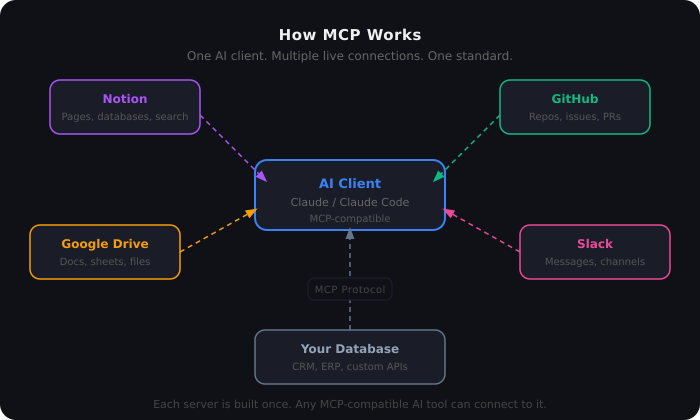
A hub-and-spoke architecture diagram showing how MCP works. A central AI client (Claude / Claude Code) connects via the MCP Protocol to five external servers: Notion, GitHub, Google Drive, Slack, and a custom database. Each server is built once and can be connected to any MCP-compatible AI tool. Dashed coloured lines represent live connections between the AI and each data source.
What an MCP server can expose
When a tool builds an MCP server, it decides what to make available. There are three categories:
Tools: Actions the AI can trigger. For a GitHub MCP server, this might include creating a pull request, searching issues, or reading a file from a repository.
Resources: Data the AI can read. For a database MCP server, this might be tables of records the AI can query.
Prompts: Pre-written templates the server provides. These are optional and less commonly used.
The AI can see what tools and resources are available through the MCP connection, and it can decide which ones to use based on the task it's working on.
A real example: competitive analysis using MCP
Here's how multiple MCP connections work together in practice.
Say you ask Claude to research a competitor and summarise what they've shipped in the last month.
Without MCP: you'd manually gather links, paste in content, and describe what you want Claude to do with it.
With MCP: Claude connects to a web search MCP server to find recent news. It connects to a GitHub MCP server to check the competitor's public repository for recent commits. It connects to your Google Drive MCP server to pull in any internal briefing docs you've already written. It then synthesises all of that into a summary.
You gave it one instruction. It gathered from multiple live sources and produced the output.
That's MCP in action: a standard layer that lets the AI connect to real systems rather than working only from what you paste into the chat.
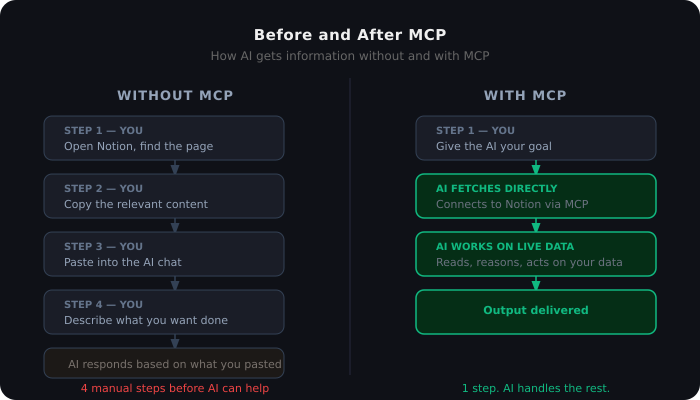
A split diagram comparing how information reaches an AI without and with MCP. Without MCP: the user opens a tool, copies content, pastes it into chat, and describes the task — four steps before the AI can help. With MCP: the user gives a goal, the AI fetches data directly via a live connection, works on it, and delivers the output — one step, AI handles the rest.
What MCP requires to set up
MCP is not plug-and-play for most people right now. It requires some technical setup.
To connect an MCP server, you typically need to install a package (usually via Node.js or Python), configure a JSON file that tells your AI tool where the server is, and in some cases manage authentication credentials.
For developers, this is straightforward. For non-developers, the setup can be a barrier. The ecosystem is improving: there are registries of available MCP servers and tools that simplify installation. But as of early 2026, it's still more technical than, say, installing a browser extension.
That said, the platforms are working to abstract this. Copilot Studio allows you to add MCP connections through a UI. Claude Desktop has a settings panel for managing connections. The friction is decreasing.
What MCP is not
A few misconceptions worth clearing up.
MCP is not an AI model. It's a protocol, like HTTP. It's the connection layer, not the intelligence.
MCP doesn't make AI smarter. It gives AI access to more information and more actions. What it does with that access still depends on the model and how you've configured it.
MCP is not the only way to connect AI to tools. Many platforms have their own proprietary integration approaches. MCP is an open standard, which means it's designed to work across platforms, but individual tools can still build their own connectors that work only in their ecosystem.
MCP servers don't guarantee quality. A poorly built MCP server that exposes 50 redundant tools will cause problems. Loading too many tools into an AI's context can degrade performance and increase cost. The quality of the server matters.
Why this is significant for automation
If you've been building automation workflows in Power Automate, Zapier, or similar tools, MCP is worth paying attention to.
Those platforms work through connectors: pre-built integrations to specific services. You pick a service, authenticate, and use the actions it provides. It works well, but each connector is specific to one platform.
MCP is a connector standard that works across AI platforms. An MCP server built for Claude also works with any other MCP-compatible tool. Build once, connect to many.
For enterprise teams, this is relevant because it means your internal tools and data systems could become accessible to any AI tool your organisation adopts, through one integration point rather than many.
How MCP connects to the next posts in this series
MCP is one half of how AI agents get access to information and tools. The other half is Agent Skills, which we cover in Part 3.
The short version: MCP connects an agent to your systems. Skills teach the agent how to use those connections effectively. A Notion MCP connection lets Claude access your workspace. A meeting prep skill tells Claude which pages to pull, how to format what it finds, and what your team's standards are.
They're not competing approaches. They work together.
Part 3: What are Agent Skills, and how do they give Claude persistent knowledge?
Part 4: Power Automate as an agent platform: what's already possible
Part 5: Agent Skills vs. MCP: when to use which
Part 6: Claude vs. Copilot Studio: an honest comparison from someone who uses both
Frequently Asked Questions
What does MCP stand for? Model Context Protocol. It's an open standard for connecting AI applications to external tools and data sources.
Who created MCP? Anthropic introduced MCP in November 2024. In December 2025, governance was transferred to the Linux Foundation. It is now backed by Anthropic, OpenAI, Google, Microsoft, AWS, and others.
Do I need to be a developer to use MCP? Currently, most MCP setup requires some technical knowledge. Installation typically involves command-line tools and JSON configuration files. Platforms like Copilot Studio are adding UI-based setup to reduce this barrier.
Is MCP only for Claude? No. MCP is an open standard. Any AI application that supports it can connect to any MCP server. Claude, Cursor, and other tools all support MCP connections.
How many MCP servers are available? As of early 2026, there are over 10,000 active MCP servers across the ecosystem, covering tools like Notion, GitHub, Google Drive, Slack, databases, and many more.
What's the difference between MCP and a regular API? An API is a connection between two specific systems. MCP is a standard protocol that any AI client can use to connect to any MCP-compatible server, without custom code for each pair. The difference is portability and reuse.
